Real estate development pro forma template
A free development pro forma you can download as an Excel file or use right here. Enter land, hard and soft costs, the construction loan and the sale, and ProformaKit works out total development cost with construction interest, yield on cost, profit, IRR and equity multiple, month by month.
Sample project Made-up numbers to show how it works. Change any of them to start your own.
Pro forma results
Total development cost
$14,848,230
Profit
$2,676,308
Margin on cost
18.0%
Yield on cost
6.62%
+112 bps over the exit cap
Levered IRR
22.6%
Return on equity, yearly
Equity multiple
1.51x
Capital stack and sale
- Loan (65% of cost)
- $9,651,349
- Equity required
- $5,196,880
- Construction interest
- $918,230
- Contingency
- $480,000
- Exit value
- $17,882,182
- Selling costs
- -$357,644
- Unlevered IRR
- 15.4%
- Sale
- Month 27, Apr 2028
- Total cost per unit
- $309,338
- Profit per unit
- $55,756
Monthly spend and funding
Equity first, then the loan
Show the monthly table
| Month | Cost | Equity | Loan draw | Interest | Loan balance |
|---|---|---|---|---|---|
| Jan 2026 | $2,400,000 | $2,400,000 | $0 | $0 | $0 |
| Feb 2026 | $89,063 | $89,063 | $0 | $0 | $0 |
| Mar 2026 | $155,581 | $155,581 | $0 | $0 | $0 |
| Apr 2026 | $280,594 | $280,594 | $0 | $0 | $0 |
| May 2026 | $449,024 | $449,024 | $0 | $0 | $0 |
| Jun 2026 | $640,556 | $640,556 | $0 | $0 | $0 |
| Jul 2026 | $832,087 | $832,087 | $0 | $0 | $0 |
| Aug 2026 | $1,000,517 | $349,975 | $650,542 | $0 | $650,542 |
| Sep 2026 | $1,125,530 | $0 | $1,129,596 | $4,066 | $1,780,137 |
| Oct 2026 | $1,192,048 | $0 | $1,203,174 | $11,126 | $2,983,311 |
| Nov 2026 | $1,192,048 | $0 | $1,210,694 | $18,646 | $4,194,005 |
| Dec 2026 | $1,125,530 | $0 | $1,151,742 | $26,213 | $5,345,747 |
| Jan 2027 | $1,000,517 | $0 | $1,033,928 | $33,411 | $6,379,675 |
| Feb 2027 | $832,087 | $0 | $871,960 | $39,873 | $7,251,634 |
| Mar 2027 | $640,556 | $0 | $685,878 | $45,323 | $7,937,513 |
| Apr 2027 | $449,024 | $0 | $498,634 | $49,609 | $8,436,146 |
| May 2027 | $280,594 | $0 | $333,320 | $52,726 | $8,769,467 |
| Jun 2027 | $155,581 | $0 | $210,390 | $54,809 | $8,979,857 |
| Jul 2027 | $89,063 | $0 | $145,187 | $56,124 | $9,125,045 |
| Aug 2027 | $0 | $0 | $57,032 | $57,032 | $9,182,076 |
| Sep 2027 | $0 | $0 | $57,388 | $57,388 | $9,239,464 |
| Oct 2027 | $0 | $0 | $57,747 | $57,747 | $9,297,211 |
| Nov 2027 | $0 | $0 | $58,108 | $58,108 | $9,355,318 |
| Dec 2027 | $0 | $0 | $58,471 | $58,471 | $9,413,789 |
| Jan 2028 | $0 | $0 | $58,836 | $58,836 | $9,472,625 |
| Feb 2028 | $0 | $0 | $59,204 | $59,204 | $9,531,829 |
| Mar 2028 | $0 | $0 | $59,574 | $59,574 | $9,591,403 |
| Apr 2028 | $0 | $0 | $59,946 | $59,946 | $9,651,349 |
What the template works out
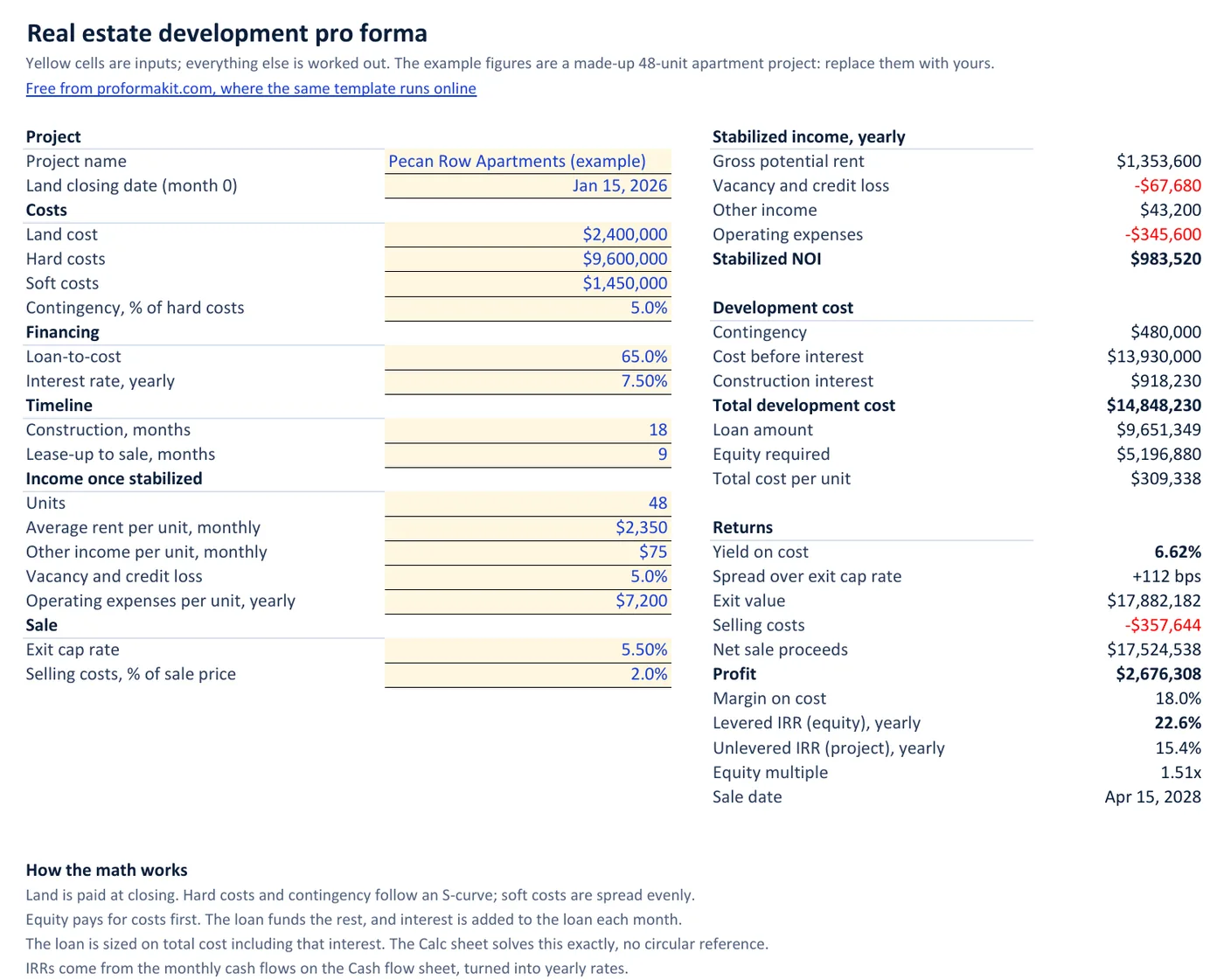
The example loaded above is a made-up 48-unit apartment building, broken down per unit in the multifamily development pro forma. Land costs $2,400,000, construction $9,600,000 in hard costs and $1,450,000 in soft costs, with 5% contingency on the hard costs. A 65% loan-to-cost construction loan at 7.5% funds the rest over an 18-month build and a 9-month lease-up.
From those inputs the pro forma gives a total development cost of $14,848,230, of which $918,230 is construction interest. Rents of $2,350 a month, less vacancy and $7,200 a unit in yearly operating costs, leave stabilized NOI of $983,520. That is a 6.62% yield on cost, +112 bps over the 5.5% exit cap rate. Sold at that cap rate, the building is worth $17,882,182, for a profit of $2.7M, a 22.6% levered IRR and a 1.51x equity multiple.
How the construction interest is worked out
Land is paid at closing, month 0. Hard costs and contingency follow an S-curve: slow during sitework, heaviest mid-build, slow again at finishes. Soft costs are spread evenly. Each month, equity pays first. In the example the $5,196,880 of equity runs out in month 7, and the loan funds every dollar after that.
Interest is charged monthly on the balance already drawn and added to the loan, so it compounds; the construction loan interest calculator shows the effect on a loan by itself. That creates the loop every development model has to deal with: the loan is 65% of total cost, total cost includes interest, and interest depends on the loan. The usual spreadsheet fix is Excel's iterative calculation, where one error can get stuck in the loop until you break it by hand. This template solves it directly. For each month in which the equity could run out there is exactly one total cost that balances, and only one of those months is consistent. The online version and the Excel file use the same method. We recalculated the Excel file in Microsoft Excel and compared it with the online calculator: the same total cost, interest, IRR and equity multiple for the example and for three edge cases: a 20% loan at 24% over 60 months of construction and 60 of lease-up, no loan at all, and a project worth less than it cost.
What it leaves out
It models one senior construction loan and one pool of equity. There is no mezzanine debt, preferred equity or investor waterfall, so if your deal splits profit between a sponsor and limited partners, you need a model with a waterfall on top of this. Loan fees and points are not separate lines; add them to soft costs. Interest during lease-up is added to the loan until the sale rather than paid from rental income, which overstates interest a little on a project that leases quickly.
The exit is a sale at stabilization, valued at NOI divided by the exit cap rate. Holding the building and refinancing out of the construction loan is not modelled yet, and neither are taxes.
Inputs worth a second look
- Hard costs. Use the contractor's bid or guaranteed maximum price, and keep contingency separate so you can see how much of it is left as the job goes on.
- Soft costs. Architecture, engineering, permits, impact fees, legal, insurance, property taxes during construction, the developer fee and lease-up marketing all belong here.
- Lease-up. Interest keeps accruing on the full balance until the sale, so a month of lease-up costs more interest than a month of construction: by then the whole loan is drawn.
- Exit cap rate. Use the cap rate you expect when you sell, 27 months out in the example, not the cap rate on today's trades.
From the pro forma to a budget and a draw schedule
Once the deal works, the same project carries over. The construction budget template builds its cost categories from this pro forma, and the draw schedule template plans one loan draw for every month the loan funds. A walk-through of the example with the monthly table is in the pro forma example.
Questions developers ask
Is this development pro forma template free?
Yes. The Excel file downloads without an email address, and the online version needs no account. Neither has a paid version.
How is construction interest calculated?
Monthly, on the loan balance drawn so far, and added to the loan rather than paid in cash. Equity pays for costs first, so no interest accrues until the equity is spent. The loan keeps accruing interest through lease-up until the sale.
Why does the loan amount depend on the interest?
Lenders size a construction loan on total cost, and total cost includes the interest the loan itself will charge. In the example, interest adds $918,230 to the cost, and 65% of that is borrowed too. The template solves this exactly, without a circular reference.
What is the difference between levered and unlevered IRR?
Unlevered IRR is the return on the whole project as if it were paid for in cash. Levered IRR is the return on the equity after the loan is repaid from the sale. In the example they are 15.4% and 22.6%: borrowing at 7.5% against a project earning more than that lifts the return on equity.
Does the Excel template work in Google Sheets?
It is built and checked in Microsoft Excel and uses only standard functions, with no macros. Google Sheets has every function it uses, so importing it should work, but Excel is the only program we have tested it in.
Can I use it for condos, townhomes or lot sales?
Not well yet. The template values the finished project from its net operating income and an exit cap rate, which suits rental property. A for-sale project needs unit sales and closing timing, which it does not model.
Want it for your team and your lender?
The free tool works for one person in one browser. If enough developers ask for shared projects, invoice approvals and draw packages a lender can open, those come next. Leave your email and we will write once, if they ship.