Construction budget template for developers
A free construction budget you can download as an Excel file or use right here. Every cost line carries four numbers: the budget, what is committed in signed contracts, what is spent, and the forecast at completion. ProformaKit works out variance and contingency left and flags lines that cannot both be right.
Sample project Made-up numbers to show how it works. Change any of them to start your own.
Budget
$14,848,230
Committed
$12,843,837
86.5% of budget
Spent
$9,390,885
63.2% of budget
Forecast
$14,848,230
Variance
On budget
Contingency left
$160,000
Budget not yet committed
| Category | Budget | Committed | Spent | Forecast | Variance | Remove |
|---|---|---|---|---|---|---|
$ | $ | $ | $ | – | ||
$ | $ | $ | $ | $110,000 | ||
$ | $ | $ | $ | -$30,000 | ||
$ | $ | $ | $ | -$80,000 | ||
$ | $ | $ | $ | – | ||
| Total | $14,848,230 | $12,843,837 | $9,390,885 | $14,848,230 | – |
Why four columns instead of budget vs actual
Look at hard costs in the example. The budget is $9,600,000 and $5,858,564 has been paid, so a two-column budget vs actual sheet shows the line $3,741,436 under budget. But $8,910,000 is already signed, and the forecast is $9,710,000: the line is heading $110,000 over. The committed and forecast columns are where an overrun shows up first. The actual column catches up months later, when the invoices arrive.
What is in the Excel version
The download breaks the example into the line items a developer tracks: purchase price, closing costs and due diligence under land; site work, structure, envelope, mechanical, electrical and plumbing, interiors and the general contractor's fee under hard costs; design, permits and impact fees, legal, insurance, property taxes during construction and lease-up marketing under soft costs; hard and soft contingency; and construction interest. There are ten empty rows for your own lines. Mark contingency lines with yes and the summary works out how much is left.
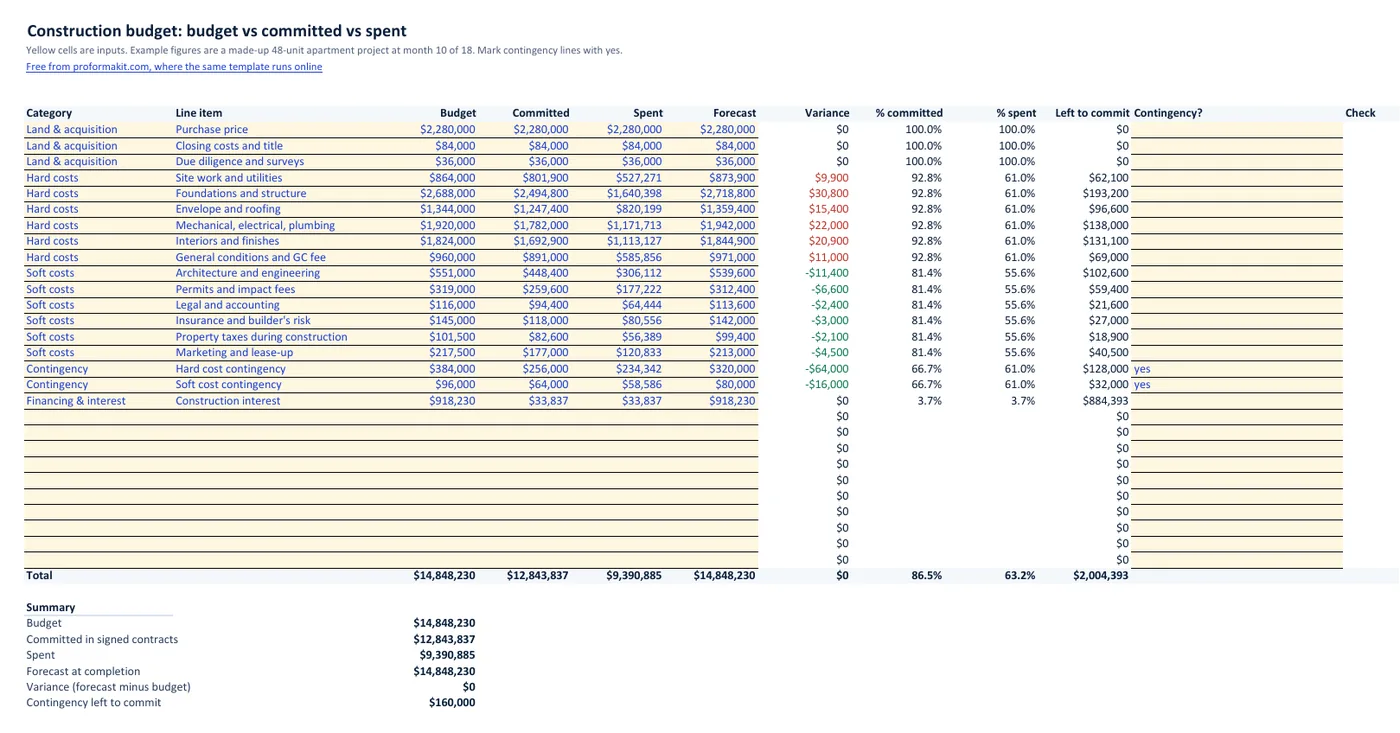
The two checks it runs
Spent is more than committed. Money went out with no signed contract behind it, for example a change order paid before it was signed.
Committed is more than budget. The category is over before the work is done. Move budget from contingency, or from a line that came in under, so the forecast stays honest.
Where it stops
This is a budget, not an approval system. It does not log change orders, approve invoices, hold retainage or collect lien waivers, and it covers one project at a time. Teams that need those pay for a platform; Rabbet, one of the few that publishes prices, listed plans from $375 to $840 per project per month, billed annually with a $15,000 minimum, when we checked on 18 Oct 2026. For one to three projects, four columns kept up to date every month go a long way. The overall picture on this example: 86.5% of the budget is committed and 63.2% is spent.
Connected to the pro forma and the draws
Online, the budget can start from the development pro forma, so its categories add up to the same total cost. What you spend each month is what the lender funds through the construction draw schedule. How draws work, and the cash you carry while you wait for them, is covered in how construction loan draws work.
Questions developers ask
Is this construction budget template free?
Yes. The Excel file downloads without an email address and the online version needs no account. There is no paid version.
What is the difference between committed and spent?
Committed is what you have promised in signed contracts and purchase orders. Spent is what you have paid. A signed $1 million framing contract with $400,000 billed so far is $1 million committed and $400,000 spent.
What is the difference between budget, forecast and variance?
Budget is the approved amount for a line. Forecast is what you now expect that line to cost when the project is finished. Variance is forecast minus budget, so a positive variance is an overrun.
What does contingency left mean?
Contingency left is the contingency budget not yet committed to anything. In the example, $320,000 of the $480,000 contingency is committed, which leaves $160,000.
Can I start the budget from my pro forma?
Online, yes: the Build from pro forma button replaces the budget with land, hard costs, soft costs, contingency and financing from your pro forma, with an undo. In Excel, copy the totals from the pro forma template into the budget column.
Does it track change orders, invoices or retainage?
No. Change orders show up as changes to committed and forecast, but there is no separate change order log, invoice list or retainage. Those need a paid platform or a separate sheet.
Want it for your team and your lender?
The free tool works for one person in one browser. If enough developers ask for shared projects, invoice approvals and draw packages a lender can open, those come next. Leave your email and we will write once, if they ship.